
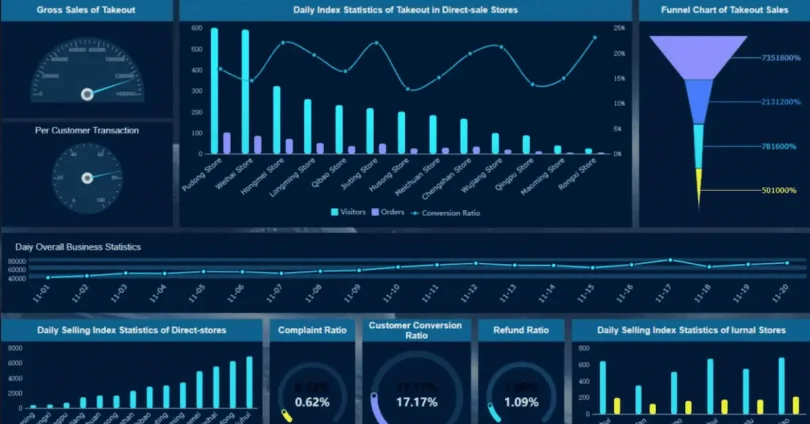

In today’s business world, making decisions based on data is no longer optional — it’s essential. Business Intelligence (BI) software helps companies collect, analyze, and visualize data so they can understand trends, track performance, and make smarter decisions.
For many small businesses and startups, expensive BI tools can be a barrier. Luckily, in 2026 there are several powerful free BI software options that provide essential features without costing a dime. These tools allow businesses to gain valuable insights, create reports and dashboards, and improve decision-making, all while staying within budget.
In this article, we’ll explore the top free business intelligence software, their features, and how they can help your business grow efficiently.
What is Business Intelligence Software?
Business Intelligence (BI) software is a powerful tool that allows businesses to collect, analyze, and visualize data in an organized way. Instead of manually digging through spreadsheets, databases, or reports, BI software automates the process, saving time and reducing errors.
How BI Software Works
BI software works by connecting to different data sources — such as sales records, customer databases, marketing platforms, or financial systems — and bringing all the information together in one place. It then processes this data to generate visual dashboards, charts, and reports that are easy to understand.
Key Features of BI Software
- Data Visualization: Turn complex numbers into charts, graphs, and interactive dashboards.
- Automated Reporting: Generate regular reports automatically without manual effort.
- Data Analysis: Identify trends, patterns, and anomalies quickly.
- Collaboration: Share insights with team members for faster decision-making.
- Real-Time Insights: Monitor business performance instantly with up-to-date data.
Benefits for Businesses
- Better Decision-Making: Access to clear, actionable insights helps businesses make smart decisions quickly.
- Efficiency: Automating data collection and reporting reduces workload for teams.
- Accuracy: Reduces the risk of human errors from manual data handling.
- Competitive Advantage: Businesses that use BI software can spot opportunities and threats faster than competitors.
In short, Business Intelligence software turns raw data into actionable insights, helping businesses of all sizes operate smarter, save time, and make informed decisions that drive growth.
you may also like to read these posts;
Product Growth Analytics Tools: Boost Engagement & Revenue
How to Build a Data Driven Growth Strategy
Marketing Performance Analytics Guide for Beginners
Customer Growth Data Analysis: Track, Analyze, Grow
Growth Analytics for Startups: Key Metrics & Tools
Why Businesses Use Free Business Intelligence Software

Businesses today generate huge amounts of data from sales, marketing, finance, and customer interactions. While paid BI tools offer advanced features, not every company can afford them — especially small businesses and startups. Free Business Intelligence (BI) software offers an affordable way to access essential analytics and reporting tools without spending money upfront.
1. Cost-Effective Solution for Startups and Small Businesses
Startups and small teams often operate on limited budgets. Free BI software allows them to analyze data, track performance, and make informed decisions without paying expensive subscription fees. This makes it easier to compete with larger companies that already have access to premium BI tools.
2. Beginner-Friendly and Easy to Learn
Many free BI tools, like Google Data Studio and Power BI Free, are designed for beginners. They often include pre-built templates, drag-and-drop dashboards, and intuitive interfaces, so even non-technical users can create reports and visualize data quickly. This lowers the learning curve and helps teams start analyzing data immediately.
3. Quick and Actionable Insights
Free BI software allows businesses to turn raw data into insights quickly. For example, a marketing team can track website traffic trends, a sales team can monitor performance against targets, and management can get an overview of overall business health — all without waiting for manual reports. These insights help teams make decisions faster and more confidently.
4. Collaboration Across Teams
Even free versions of BI tools often allow dashboard and report sharing, making it easier for teams to collaborate. Multiple team members can access the same data in real time, reducing misunderstandings and ensuring everyone works with accurate information. For instance, a sales and marketing team can track campaign performance together using a shared dashboard. free business intelligence software
5. Scalable and Upgradeable
Many free BI tools are designed to grow with your business. You can start with basic features to understand your data and later upgrade to paid versions for larger datasets, more integrations, or advanced analytics. This scalability ensures that businesses don’t outgrow their BI tool too quickly, saving time and costs in the long run. free business intelligence software
6. Encourages a Data-Driven Culture
Using free BI software helps businesses develop a culture of data-driven decision-making. When team members have access to clear insights and reports, they can make informed choices rather than relying on intuition. Over time, this approach improves performance, efficiency, and overall business strategy. free business intelligence software
In short, free business intelligence software is more than just a cost-saving option. It provides practical tools, collaboration features, and actionable insights that help businesses of all sizes start their data-driven journey effectively.
Top Free Business Intelligence Software in 2026
Here are the best free business intelligence tools in 2026 that help businesses analyze data, create reports, and make smarter decisions without spending a dime. free business intelligence software
1. Google Data Studio
Google Data Studio is a free, web-based BI tool that allows businesses to create interactive dashboards and detailed reports. It connects seamlessly with Google Sheets, Google Analytics, Google Ads, and other data sources, allowing marketers and business owners to pull real-time data effortlessly. Its drag-and-drop interface makes creating dashboards simple, while features like customizable charts, filters, and calculated metrics allow for deeper analysis. Dashboards can be shared with colleagues for collaboration, making it easy for teams to work from the same data. Google Data Studio is best for small businesses, marketing teams, and anyone already using Google’s ecosystem who wants professional-looking reports without any cost. free business intelligence software
2. Microsoft Power BI (Free Version)
Power BI’s free version provides essential tools to analyze data and create interactive dashboards. It integrates naturally with Excel, SharePoint, and other Microsoft products, making it convenient for businesses already using Microsoft 365. Users can build visual reports with charts, graphs, and maps, while the drag-and-drop editor simplifies dashboard creation. The free version has some limitations on storage and sharing but is perfect for individuals or small teams wanting a reliable, beginner-friendly BI solution. Power BI also has a large online community and tutorials, which is helpful for learning new techniques and solving problems quickly. free business intelligence software
3. Tableau Public
Tableau Public is a free version of Tableau that lets users create visually appealing dashboards and visualizations that can be shared publicly online. It supports connections to multiple data sources, including Excel and cloud services, and allows users to explore data interactively. Tableau Public is ideal for learning and practicing BI skills or showcasing reports publicly for clients, portfolio purposes, or open data projects. While it lacks private sharing in the free version, its intuitive interface, rich visualization options, and strong community support make it an excellent choice for individuals and students. free business intelligence software
4. Zoho Analytics (Free Plan)
Zoho Analytics offers a free plan with core BI features, allowing small teams to generate reports, dashboards, and data visualizations. It integrates with over 500 business applications, including Zoho CRM, Google Workspace, and popular cloud storage platforms, enabling seamless data collection from multiple sources. Users can choose from pre-built templates, create custom dashboards, and collaborate with teammates in real time. Zoho Analytics is especially suitable for startups and small businesses that need essential BI features without the cost, with the flexibility to upgrade to paid plans as the business grows.
5. Metabase
Metabase is an open-source BI tool that lets teams query data and create interactive dashboards easily. It supports both SQL and no-code querying, making it flexible for technical users and beginners alike. Businesses can customize dashboards, filter data dynamically, and visualize trends with charts and graphs. Being open-source and self-hosted, it provides full control over data privacy, making it ideal for businesses with sensitive information. Metabase is best suited for technical teams or organizations that want a flexible, cost-free BI solution with scalability and community-driven support. free business intelligence software
How to Choose the Right Free Business Intelligence Software

Choosing the best free BI software is important to make sure it fits your business needs and team capabilities. Here’s a detailed guide to help you select the right tool. free business intelligence software
1. Consider Ease of Use
Some BI tools are very beginner-friendly, like Google Data Studio and Power BI Free, with drag-and-drop interfaces and pre-built templates. Others, like Metabase, may require some technical knowledge to set up dashboards and query data. Think about your team’s experience level and pick a tool that your staff can use easily without extensive training. free business intelligence software
2. Check Data Integration Capabilities
A good BI tool should connect easily to your existing data sources. Look for software that can integrate with Excel, Google Sheets, cloud apps, CRMs, and databases. This allows you to automatically pull data without manually exporting files, saving time and reducing errors. free business intelligence software
3. Evaluate Visualization Options
Visualization is a key benefit of BI software. Make sure the tool allows you to create interactive dashboards, charts, graphs, and tables. The visualizations should be easy to customize so your team can interpret the data quickly and make informed decisions. free business intelligence software
4. Collaboration Features
Sharing insights is essential for team decision-making. Check if the software allows you to share dashboards and reports with colleagues, assign permissions, and collaborate in real time. Tools with strong collaboration features ensure everyone is working from the same accurate data. free business intelligence software
5. Consider Scalability and Upgrade Options
Many free BI tools offer paid plans for additional features, storage, or support. Choose a tool that can grow with your business, so you won’t need to switch platforms as your data needs expand. This ensures continuity and avoids disruptions when your business scales. free business intelligence software
6. Match Features with Business Needs
Finally, consider the specific needs of your business. If your main goal is marketing analytics, tools like Google Data Studio are ideal. If your team uses Microsoft products heavily, Power BI Free might be better. Technical teams who want self-hosted flexibility may prefer Metabase. Choosing a tool that aligns with your business objectives ensures you get the most value from your BI software. free business intelligence software
Can free BI software handle large amounts of data?
Most free BI tools are designed for small to medium datasets. While they can handle regular business data like sales or marketing metrics, very large datasets may require paid versions or more advanced platforms. Free tools are great for startups and small teams testing BI capabilites
Are free BI tools suitable for businesses?
Yes. Free BI software provides essential reporting and dashboard features that help businesses analyze data, track performance, and make informed decisions. They are ideal for small businesses, startups, and teams exploring BI without committing to a subscription.
Do I need technical knowledge to use free BI software?
It depends on the tool. Platforms like Google Data Studio and Power BI Free are beginner-friendly, with drag-and-drop interfaces and templates. Tools like Metabase may require some technical skills, especially for SQL queries or self-hosted setups.
Conclusion
Free business intelligence software is an excellent way for businesses, startups, and small teams to explore data analytics without spending money. Tools like Google Data Studio, Power BI Free, Tableau Public, Zoho Analytics, and Metabase offer dashboards, reports, and visualizations that help companies make smarter decisions, save time, and track performance efficiently.
By choosing the right free BI tool based on your team’s needs, data sources, and technical skills, businesses can unlock the power of their data, improve collaboration, and develop a data-driven culture that supports growth. Starting with a free tool today can prepare your business for more advanced analytics in the future.


